Did you know that you can navigate the posts by swiping left and right?
How To Use Any Jekyll Plugins on GitHub Pages with CircleCI
20 Mar 2019
. Category:
jekyll
.
Comments
Jekyll Plugin Issue with GitHub Pages
For this blog, I knew I wanted to be able to customize it and did not want to learn how to customize WordPress themes. The idea of using a static site generator like Jekyll was appealing to me because I would not have to deal with a database. Also since GitHub Pages hosts and automatically builds Jekyll sites, I would not have to deal with hosting. I went about installing Jekyll locally, created a starter blog site and pushed my changes to GitHub. z3nth10n.github.io was up and running quickly!
Then I wanted to embed a YouTube link to a blog post. @joelverhagen posted a simple Jekyll YouTube Embed Plugin gist. I tested locally and it generated the blog post and site fine. But when GitHub Pages tried to build the static html files it failed with an Liquid Exception: Unknown tag 'youtube' error message.
Apparently and understandably, GitHub Pages does not allow any arbitrary plugin as part of their Jekyll build process; specifically, bundle exec jekyll build —safe is ran. Instead GitHub Pages whitelists a limited set of Jekyll plugins listed here, only 47 at the time of this writing. So if you want to use a plugin that is not yet officially supported, you will have to ask GitHub support to add it. Here is an example: “Please please, whitelist jekyll-asciidoc plugin”. Jekyll’s Plugin documentation page suggests this workaround:
You can still use GitHub Pages to publish your site, but you’ll need to convert the site locally and push the generated static files to your GitHub repository instead of the Jekyll source files.
The workaround is not as seamlessly as just simply pushing your branch to GitHub and having GitHub Pages automatically build the static site. I could had followed the suggestion and written a rake task to automate this locally but then I would have to remember to run the one extra command.
Taking Over Continuous Integration with CircleCI
Jekyll documentation has a neat example of Continuous Integration with html-proofer. Running html-proofer will ensure that the html output will not have any broken links, images, etc. So I figured that I’d kill two birds with one stone and set up continuous integration on CirleCI. It will both run html-proofer and build the static html files. The workflow:
- Push to a special gh-pages-ci branch
- CircleCI watches only the gh-pages-ci branch
- Test site via html-proofer
- Build the static html files
- Push the static html files to the git master branch
- This triggers GitHub Pages to update the site
I chose to use the gh-pages-ci branch because I’ll likely use this technique for static html projects sites where GitHub Pages watches the gh-pages instead of master branch. The relevant scripts used in this workflow are below:
The rake task in the Rakefile that runs html-proofer:
    require 'html/proofer'

    task :test do
      sh "bundle exec jekyll build"
      HTML::Proofer.new(
        "./_site",
        check_html: true,
        only_4xx: true
      ).run
    end
The script/build_html script that will build the Jekyll site and push it to the master git branch:
    #!/bin/bash -ex

    GIT_COMMIT_DESC="$1"

    # Setup git so we can use it
    git config --global user.email "<your email>"
    git config --global user.name "<your username>"

    # Remove changes from current gh-pages-ci branch
    git checkout -f
    git checkout master

    # Make sure that local master matches with remote master
    # CircleCI merges made changes to master so need to reset it
    git fetch origin master
    git reset --hard origin/master

    # Gets _site/* files and pushes them to master branch
    # Note: CircleCI creates vendor and .bundle files
    mv _site /tmp/
    rm -rf * .bundle .sass-cache
    mv /tmp/_site/* .
    git add --all
    git commit -m "$GIT_COMMIT_DESC"
    git push origin master
The circle.yml that is configured to only watch for changes in the gh-pages-ci branch:
defaults: &defaults
working_directory: ~/repo
version: 2
jobs:
build:
<<: *defaults
docker:
- image: circleci/ruby:2.6.0-node
filters:
branches:
only:
- gh-pages-ci
ignore:
- master
environment:
BUNDLER_VERSION: 2.0.1
BUNDLE_PATH: ~/repo/vendor/bundle
GIT_COMMIT_DESC: git log -1 --pretty=%B
JEKYLL_ENV: production
steps:
- checkout
- restore_cache:
keys:
- rubygems-v1-{{ checksum "Gemfile.lock" }}
- rubygems-v1-fallback
# If you have submodules maybe you need to uncomment this
# - run:
# name: Update Git submodules
# command: git submodule update --init --recursive
- run:
name: Bundle Pre Install
command: gem install bundler:$BUNDLER_VERSION
- run:
name: Bundle Install
command: bundle check || bundle install
- run:
name: Rake tests
command: bundle exec rake
- save_cache:
key: rubygems-v1-{{ checksum "Gemfile.lock" }}
paths:
- vendor/bundle
- run:
name: Jekyll build
command: bundle exec jekyll build --trace
- run:
name: Run Build HTML
command: bash ~/repo/script/build_html "`$GIT_COMMIT_DESC`"
workflows:
version: 2
test-deploy:
jobs:
- build
One CircleCI Gotcha
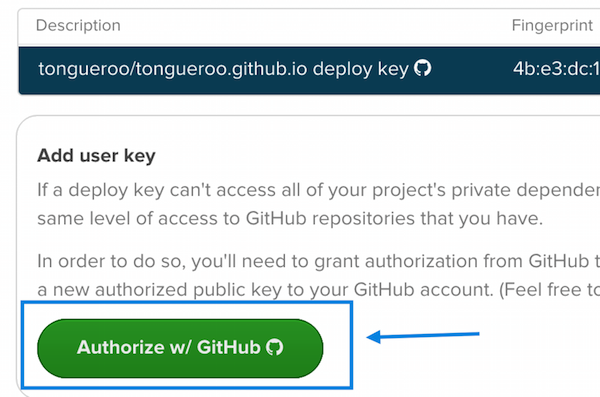
CircleCI is great about being security conscientious. They set things up so that a deploy read-only ssh key is used to clone the repo. Since the build_html script above pushes to master at the end, you will need to add a key that has write access to the repo. This is a simple 1-click step in “Project Settings -> Permissions / Checkout SSH Keys”.
Summary of the Final Flow
All I have to do now to update the blog is make modifications to the gh-pages-ci branch and then run git push. It was more work to set this all up than just having GitHub Pages build the Jekyll site but the site will always be checked by html-proofer now. And now I am also able to use any Jekyll plugin that I need! 