Did you know that you can navigate the posts by swiping left and right?

Jekyll-ga-v2 a plugin to get Google Analytics data into your site

22 Mar 2019 . Category: jekyll-plugin . Comments

In this post I will explain how to use the plugin called jekyll-ga-v2. I created this plugin to be able to implement a widget that shows information that Google Analytics can offer to us.

Note: Requires Ruby 2.5+ and Jekyll 3.8+

What is this used for?

A Jekyll plugin that downloads Google Analytics data and adds it to your Jekyll website. The Google Analytics metric is added to each post/page’s metadata and is accessible as page.stats. It can be printed in a template.

Installation

This plugin requires three Ruby gems:

$ sudo gem install chronic
$ sudo gem install google-api-client
$ sudo gem install googleauth

Add this line to your site’s Gemfile:

gem 'jekyll-ga-v2'

Set up a service account for the Google data API

  • Go to https://code.google.com/apis/console/b/0/ and create a new project.
  • Turn on the Analytics API and accept the terms of service
  • Go to API Access on the left sidebar menu, create a new oauth 2.0 client ID, give your project a name, and click next.
  • Select Application type: Service account, and click Create client ID
  • note the private key’s password. It will probably be notasecret unless Google changes something. You’ll need to use this value to decrypt the PCKS12 file (later explanined).
  • Download the private key. Save this file because you can only download it once.
  • Note the Email address for the Service account. You’ll need this for your configuration settings and in the next step.
  • Log into Google Analytics and add the service account email address as a user of your Google Analytics profile: From a report page, Admin > select a profile > Users > New User

Configuration of the environment variables

GoogleAuth needs the following environment variables to work.

There is an easy way to implement this using CircleCI (maybe you are using similar to deploy your Jekyll website). If you’re not familiar with CircleCI you’ll need to read carefully this post on my blog about “How To Use Any Jekyll Plugins on GitHub Pages with CircleCI”.

Once you implement it, you’ll need to go to your CircleCI dashboard search your project settings and go under “Organization > Contexts” and create a new Context.

Look at my website CircleCI.yml configuration here. The only thing remaining is to create the appropiate Context name, and then, create the required env vars:
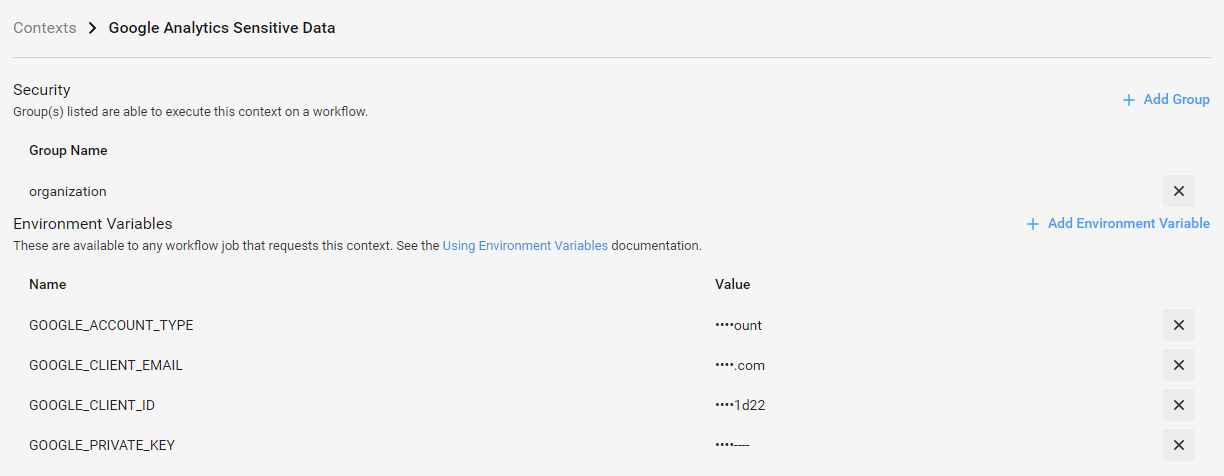
Note: The GOOGLE_PRIVATE_KEY value is the output from OpenSSL. You’ll need to execute the following command to get it from the *.p12 file:

$ openssl pkcs12 -in filename.p12 -clcerts -nodes -nocerts

You’ll need to replace all the new lines characters by \n. This can be easily done with Sublime Text 3 specifying the Regex options and the replacing \n by \\n.

Configuration

To configure jekyll-ga-v2, you need to specify some information about your Google Analytics service account (as set up above) and your report settings.

Add the following block to your Jekyll site’s _config.yml file:

####################
# Google Analytics #
####################

jekyll_ga:
  profileID: ga:<user_id>   # Profile ID 
  start: last week          # Beginning of report
  end: now                  # End of report
  compare_period: true      
  metrics: ga:pageviews     # Metrics code
  dimensions: ga:pagePath   # Dimensions
  segment:                  # Optional
  filters:                  # Optional
  max_results: 10000        # Number of the maximum results get by the API
  debug: false              # Debug mode
  • profileID is the specific report profile from which you want to pull data. Find it by going to the report page in Google Analytics. Look at the URL. It will look something like https://www.google.com/analytics/web/?hl=en&pli=1#report/visitors-overview/###########p######/. The number after the p at the end of the URL is your profileID.
  • The start and end indicate the time range of data you want to query. They are parsed using Ruby’s Chronic gem, so you can include relative or absolute dates, such as now, yesterday, last month, 2 weeks ago. See Chronic’s documentation for more options.
  • The metrics value is what you want to measure from your Google Analytics data. Usually this will be ga:pageviews or ga:visits, but it can be any metric available in Google Analytics. Specify only one. See the Google Analytics Query Explorer to experiment with different metrics. (Your dimension should always be ga:pagePath). I recommend you the following string ga:pageviews,ga:bounceRate,ga:sessions,ga:users,ga:newUsers.
  • The segment and filters keys are optional parameters for your query. See the Google Analytics Query Explorer for a description of how to use them, or just leave them out.

New params in v2:

  • If compare_period is to true, then this will create two reports (example: if start is set to “last month”, this will create one report from “end” to “start” and the second report its end will be at the start of the first report, with this data a comparation will be created).

Do you need to automatize this?

Maybe you’re thinking that you’ll need to make a new push everytime you need to update your stats. And you’re right, but CircleCI comes here again for the rescue. All you need is to schedule a nightly build.

Here is my own implementation on my CircleCI.yml configuration, again.

    nightly:
        triggers:
            - schedule:
                cron: "0 0 * * *"
                filters:
                    branches:
                        only:
                            - gh-pages-ci
                        ignore:
                            - master
        jobs:
            - build:
                context: "Google Analytics Sensitive Data"

Of course, you’ll need to specify the context again.

Need help for examples?

Look at those two HTML files I created to render my settings:

&#x3C;&#x64;&#x69;&#x76;&#x20;&#x69;&#x64;&#x3D;&#x22;&#x67;&#x65;&#x6E;&#x73;&#x74;&#x61;&#x74;&#x73;&#x22;&#x20;&#x63;&#x6C;&#x61;&#x73;&#x73;&#x3D;&#x22;&#x63;&#x6F;&#x6C;&#x2D;&#x6D;&#x64;&#x2D;&#x33;&#x20;&#x61;&#x6C;&#x69;&#x67;&#x6E;&#x2D;&#x73;&#x6D;&#x2D;&#x72;&#x69;&#x67;&#x68;&#x74;&#x20;&#x76;&#x65;&#x72;&#x74;&#x69;&#x63;&#x61;&#x6C;&#x2D;&#x6D;&#x61;&#x72;&#x67;&#x69;&#x6E;&#x20;&#x6F;&#x72;&#x64;&#x65;&#x72;&#x2D;&#x78;&#x73;&#x2D;&#x66;&#x6F;&#x75;&#x72;&#x74;&#x68;&#x20;&#x63;&#x6F;&#x6C;&#x2D;&#x78;&#x73;&#x2D;&#x65;&#x78;&#x70;&#x61;&#x6E;&#x64;&#x22;&#x3E;&#xA;&#x20;&#x20;&#x20;&#x20;&#x3C;&#x62;&#x6F;&#x78;&#x20;&#x63;&#x6C;&#x61;&#x73;&#x73;&#x3D;&#x22;&#x62;&#x6F;&#x74;&#x68;&#x2D;&#x6F;&#x66;&#x66;&#x73;&#x65;&#x74;&#x20;&#x65;&#x78;&#x70;&#x61;&#x6E;&#x64;&#x2D;&#x77;&#x69;&#x64;&#x74;&#x68;&#x22;&#x3E;&#xA;&#x20;&#x20;&#x20;&#x20;&#x20;&#x20;&#x20;&#x20;&#x3C;&#x70;&#x3E;&#xA;&#x20;&#x20;&#x20;&#x20;&#x20;&#x20;&#x20;&#x20;&#x20;&#x20;&#x20;&#x20;&#x3C;&#x68;&#x33;&#x3E;&#x7B;&#x25;&#x20;&#x74;&#x20;&#x27;&#x73;&#x74;&#x61;&#x74;&#x73;&#x2D;&#x63;&#x61;&#x70;&#x74;&#x69;&#x6F;&#x6E;&#x27;&#x20;&#x25;&#x7D;&#x3C;&#x2F;&#x68;&#x33;&#x3E;&#xA;&#x20;&#x20;&#x20;&#x20;&#x20;&#x20;&#x20;&#x20;&#x20;&#x20;&#x20;&#x20;&#x3C;&#x70;&#x3E;&#x28;&#x7B;&#x25;&#x20;&#x74;&#x20;&#x27;&#x73;&#x74;&#x61;&#x74;&#x73;&#x5F;&#x6C;&#x61;&#x73;&#x74;&#x27;&#x20;&#x25;&#x7D;&#x20;&#x7B;&#x7B;&#x20;&#x73;&#x69;&#x74;&#x65;&#x2E;&#x64;&#x61;&#x74;&#x61;&#x2E;&#x70;&#x65;&#x72;&#x69;&#x6F;&#x64;&#x20;&#x7D;&#x7D;&#x20;&#x7B;&#x25;&#x20;&#x74;&#x20;&#x27;&#x73;&#x74;&#x61;&#x74;&#x73;&#x5F;&#x64;&#x61;&#x79;&#x73;&#x27;&#x20;&#x25;&#x7D;&#x29;&#x3C;&#x2F;&#x70;&#x3E;&#xA;&#x20;&#x20;&#x20;&#x20;&#x20;&#x20;&#x20;&#x20;&#x3C;&#x2F;&#x70;&#x3E;&#xA;&#xA;&#x20;&#x20;&#x20;&#x20;&#x20;&#x20;&#x20;&#x20;&#x7B;&#x25;&#x20;&#x66;&#x6F;&#x72;&#x20;&#x68;&#x65;&#x61;&#x64;&#x65;&#x72;&#x20;&#x69;&#x6E;&#x20;&#x73;&#x69;&#x74;&#x65;&#x2E;&#x64;&#x61;&#x74;&#x61;&#x2E;&#x68;&#x65;&#x61;&#x64;&#x65;&#x72;&#x73;&#x20;&#x25;&#x7D;&#xA;&#x20;&#x20;&#x20;&#x20;&#x20;&#x20;&#x20;&#x20;&#xA;&#x20;&#x20;&#x20;&#x20;&#x20;&#x20;&#x20;&#x20;&#x20;&#x20;&#x20;&#x20;&#x3C;&#x70;&#x3E;&#xA;&#x20;&#x20;&#x20;&#x20;&#x20;&#x20;&#x20;&#x20;&#x20;&#x20;&#x20;&#x20;&#x20;&#x20;&#x20;&#x20;&#x7B;&#x25;&#x20;&#x61;&#x73;&#x73;&#x69;&#x67;&#x6E;&#x20;&#x68;&#x76;&#x61;&#x6C;&#x75;&#x65;&#x20;&#x3D;&#x20;&#x68;&#x65;&#x61;&#x64;&#x65;&#x72;&#x2E;&#x76;&#x61;&#x6C;&#x75;&#x65;&#x20;&#x7C;&#x20;&#x70;&#x6C;&#x75;&#x73;&#x3A;&#x20;&#x30;&#x20;&#x25;&#x7D;&#xA;&#x20;&#x20;&#x20;&#x20;&#x20;&#x20;&#x20;&#x20;&#x20;&#x20;&#x20;&#x20;&#x20;&#x20;&#x20;&#x20;&#x7B;&#x25;&#x20;&#x61;&#x73;&#x73;&#x69;&#x67;&#x6E;&#x20;&#x73;&#x74;&#x61;&#x74;&#x6E;&#x61;&#x6D;&#x65;&#x20;&#x3D;&#x20;&#x27;&#x73;&#x74;&#x61;&#x74;&#x73;&#x5F;&#x27;&#x20;&#x7C;&#x20;&#x61;&#x70;&#x70;&#x65;&#x6E;&#x64;&#x3A;&#x20;&#x68;&#x65;&#x61;&#x64;&#x65;&#x72;&#x2E;&#x6E;&#x61;&#x6D;&#x65;&#x20;&#x25;&#x7D;&#xA;&#x20;&#x20;&#x20;&#x20;&#x20;&#x20;&#x20;&#x20;&#x20;&#x20;&#x20;&#x20;&#x20;&#x20;&#x20;&#x20;&#x7B;&#x7B;&#x20;&#x68;&#x76;&#x61;&#x6C;&#x75;&#x65;&#x20;&#x7C;&#x20;&#x72;&#x6F;&#x75;&#x6E;&#x64;&#x20;&#x7D;&#x7D;&#x20;&#x7B;&#x25;&#x20;&#x74;&#x20;&#x73;&#x74;&#x61;&#x74;&#x6E;&#x61;&#x6D;&#x65;&#x20;&#x25;&#x7D;&#xA;&#x20;&#x20;&#x20;&#x20;&#x20;&#x20;&#x20;&#x20;&#x20;&#x20;&#x20;&#x20;&#x3C;&#x2F;&#x70;&#x3E;&#xA;&#x20;&#x20;&#x20;&#x20;&#x20;&#x20;&#x20;&#x20;&#x20;&#x20;&#x20;&#x20;&#x3C;&#x70;&#x20;&#x63;&#x6C;&#x61;&#x73;&#x73;&#x3D;&#x22;&#x73;&#x75;&#x62;&#x22;&#x3E;&#xA;&#x20;&#x20;&#x20;&#x20;&#x20;&#x20;&#x20;&#x20;&#x20;&#x20;&#x20;&#x20;&#x20;&#x20;&#x20;&#x20;&#x20;&#x20;&#x20;&#x20;&#x7B;&#x25;&#x20;&#x69;&#x66;&#x20;&#x73;&#x69;&#x74;&#x65;&#x2E;&#x6A;&#x65;&#x6B;&#x79;&#x6C;&#x6C;&#x5F;&#x67;&#x61;&#x2E;&#x63;&#x6F;&#x6D;&#x70;&#x61;&#x72;&#x65;&#x5F;&#x70;&#x65;&#x72;&#x69;&#x6F;&#x64;&#x20;&#x25;&#x7D;&#xA;&#x20;&#x20;&#x20;&#x20;&#x20;&#x20;&#x20;&#x20;&#x20;&#x20;&#x20;&#x20;&#x20;&#x20;&#x20;&#x20;&#x20;&#x20;&#x20;&#x20;&#x28;&#xA;&#x20;&#x20;&#x20;&#x20;&#x20;&#x20;&#x20;&#x20;&#x20;&#x20;&#x20;&#x20;&#x20;&#x20;&#x20;&#x20;&#x20;&#x20;&#x20;&#x20;&#x7B;&#x25;&#x20;&#x74;&#x20;&#x27;&#x73;&#x74;&#x61;&#x74;&#x73;&#x5F;&#x6C;&#x61;&#x73;&#x74;&#x27;&#x20;&#x25;&#x7D;&#x20;&#x7B;&#x7B;&#x20;&#x73;&#x69;&#x74;&#x65;&#x2E;&#x64;&#x61;&#x74;&#x61;&#x2E;&#x70;&#x65;&#x72;&#x69;&#x6F;&#x64;&#x20;&#x7D;&#x7D;&#x20;&#x7B;&#x25;&#x20;&#x74;&#x20;&#x27;&#x73;&#x74;&#x61;&#x74;&#x73;&#x5F;&#x64;&#x61;&#x79;&#x73;&#x27;&#x20;&#x25;&#x7D;&#x3A;&#x20;&#xA;&#x20;&#x20;&#x20;&#x20;&#x20;&#x20;&#x20;&#x20;&#x20;&#x20;&#x20;&#x20;&#x20;&#x20;&#x20;&#x20;&#x20;&#x20;&#x20;&#x20;&#x7B;&#x25;&#x20;&#x69;&#x66;&#x20;&#x68;&#x65;&#x61;&#x64;&#x65;&#x72;&#x2E;&#x76;&#x61;&#x6C;&#x75;&#x65;&#x5F;&#x70;&#x65;&#x72;&#x63;&#x20;&#x21;&#x3D;&#x20;&#x22;&#x221E;&#x22;&#x20;&#x25;&#x7D;&#xA;&#x20;&#x20;&#x20;&#x20;&#x20;&#x20;&#x20;&#x20;&#x20;&#x20;&#x20;&#x20;&#x20;&#x20;&#x20;&#x20;&#x20;&#x20;&#x20;&#x20;&#x20;&#x20;&#x20;&#x20;&#x7B;&#x25;&#x20;&#x61;&#x73;&#x73;&#x69;&#x67;&#x6E;&#x20;&#x70;&#x65;&#x72;&#x63;&#x20;&#x3D;&#x20;&#x68;&#x65;&#x61;&#x64;&#x65;&#x72;&#x2E;&#x76;&#x61;&#x6C;&#x75;&#x65;&#x5F;&#x70;&#x65;&#x72;&#x63;&#x20;&#x7C;&#x20;&#x70;&#x6C;&#x75;&#x73;&#x3A;&#x20;&#x30;&#x20;&#x25;&#x7D;&#xA;&#xA;&#x20;&#x20;&#x20;&#x20;&#x20;&#x20;&#x20;&#x20;&#x20;&#x20;&#x20;&#x20;&#x20;&#x20;&#x20;&#x20;&#x20;&#x20;&#x20;&#x20;&#x20;&#x20;&#x20;&#x20;&#x7B;&#x25;&#x20;&#x69;&#x66;&#x20;&#x68;&#x65;&#x61;&#x64;&#x65;&#x72;&#x2E;&#x6E;&#x61;&#x6D;&#x65;&#x20;&#x21;&#x3D;&#x20;&#x22;&#x62;&#x6F;&#x75;&#x6E;&#x63;&#x65;&#x52;&#x61;&#x74;&#x65;&#x22;&#x20;&#x25;&#x7D;&#xA;&#x20;&#x20;&#x20;&#x20;&#x20;&#x20;&#x20;&#x20;&#x20;&#x20;&#x20;&#x20;&#x20;&#x20;&#x20;&#x20;&#x20;&#x20;&#x20;&#x20;&#x20;&#x20;&#x20;&#x20;&#x20;&#x20;&#x20;&#x20;&#x7B;&#x25;&#x20;&#x69;&#x66;&#x20;&#x70;&#x65;&#x72;&#x63;&#x20;&#x3E;&#x20;&#x30;&#x20;&#x25;&#x7D;&#xA;&#x20;&#x20;&#x20;&#x20;&#x20;&#x20;&#x20;&#x20;&#x20;&#x20;&#x20;&#x20;&#x20;&#x20;&#x20;&#x20;&#x20;&#x20;&#x20;&#x20;&#x20;&#x20;&#x20;&#x20;&#x20;&#x20;&#x20;&#x20;&#x20;&#x20;&#x20;&#x20;&#x3C;&#x69;&#x20;&#x63;&#x6C;&#x61;&#x73;&#x73;&#x3D;&#x22;&#x66;&#x61;&#x73;&#x20;&#x66;&#x61;&#x2D;&#x61;&#x72;&#x72;&#x6F;&#x77;&#x2D;&#x75;&#x70;&#x20;&#x63;&#x6F;&#x6C;&#x6F;&#x72;&#x2D;&#x67;&#x72;&#x65;&#x65;&#x6E;&#x22;&#x3E;&#x3C;&#x2F;&#x69;&#x3E;&#xA;&#x20;&#x20;&#x20;&#x20;&#x20;&#x20;&#x20;&#x20;&#x20;&#x20;&#x20;&#x20;&#x20;&#x20;&#x20;&#x20;&#x20;&#x20;&#x20;&#x20;&#x20;&#x20;&#x20;&#x20;&#x20;&#x20;&#x20;&#x20;&#x7B;&#x25;&#x20;&#x65;&#x6C;&#x73;&#x69;&#x66;&#x20;&#x70;&#x65;&#x72;&#x63;&#x20;&#x3D;&#x3D;&#x20;&#x30;&#x20;&#x25;&#x7D;&#xA;&#x20;&#x20;&#x20;&#x20;&#x20;&#x20;&#x20;&#x20;&#x20;&#x20;&#x20;&#x20;&#x20;&#x20;&#x20;&#x20;&#x20;&#x20;&#x20;&#x20;&#x20;&#x20;&#x20;&#x20;&#x20;&#x20;&#x20;&#x20;&#x20;&#x20;&#x20;&#x20;&#x3C;&#x69;&#x20;&#x63;&#x6C;&#x61;&#x73;&#x73;&#x3D;&#x22;&#x66;&#x61;&#x73;&#x20;&#x66;&#x61;&#x2D;&#x65;&#x71;&#x75;&#x61;&#x6C;&#x73;&#x22;&#x3E;&#x3C;&#x2F;&#x69;&#x3E;&#xA;&#x20;&#x20;&#x20;&#x20;&#x20;&#x20;&#x20;&#x20;&#x20;&#x20;&#x20;&#x20;&#x20;&#x20;&#x20;&#x20;&#x20;&#x20;&#x20;&#x20;&#x20;&#x20;&#x20;&#x20;&#x20;&#x20;&#x20;&#x20;&#x7B;&#x25;&#x20;&#x65;&#x6C;&#x73;&#x69;&#x66;&#x20;&#x70;&#x65;&#x72;&#x63;&#x20;&#x3C;&#x20;&#x30;&#x20;&#x25;&#x7D;&#xA;&#x20;&#x20;&#x20;&#x20;&#x20;&#x20;&#x20;&#x20;&#x20;&#x20;&#x20;&#x20;&#x20;&#x20;&#x20;&#x20;&#x20;&#x20;&#x20;&#x20;&#x20;&#x20;&#x20;&#x20;&#x20;&#x20;&#x20;&#x20;&#x20;&#x20;&#x20;&#x20;&#x3C;&#x69;&#x20;&#x63;&#x6C;&#x61;&#x73;&#x73;&#x3D;&#x22;&#x66;&#x61;&#x73;&#x20;&#x66;&#x61;&#x2D;&#x61;&#x72;&#x72;&#x6F;&#x77;&#x2D;&#x64;&#x6F;&#x77;&#x6E;&#x20;&#x63;&#x6F;&#x6C;&#x6F;&#x72;&#x2D;&#x72;&#x65;&#x64;&#x22;&#x3E;&#x3C;&#x2F;&#x69;&#x3E;&#xA;&#x20;&#x20;&#x20;&#x20;&#x20;&#x20;&#x20;&#x20;&#x20;&#x20;&#x20;&#x20;&#x20;&#x20;&#x20;&#x20;&#x20;&#x20;&#x20;&#x20;&#x20;&#x20;&#x20;&#x20;&#x20;&#x20;&#x20;&#x20;&#x7B;&#x25;&#x20;&#x65;&#x6E;&#x64;&#x69;&#x66;&#x20;&#x25;&#x7D;&#xA;&#x20;&#x20;&#x20;&#x20;&#x20;&#x20;&#x20;&#x20;&#x20;&#x20;&#x20;&#x20;&#x20;&#x20;&#x20;&#x20;&#x20;&#x20;&#x20;&#x20;&#x20;&#x20;&#x20;&#x20;&#x7B;&#x25;&#x20;&#x65;&#x6C;&#x73;&#x65;&#x20;&#x25;&#x7D;&#xA;&#x20;&#x20;&#x20;&#x20;&#x20;&#x20;&#x20;&#x20;&#x20;&#x20;&#x20;&#x20;&#x20;&#x20;&#x20;&#x20;&#x20;&#x20;&#x20;&#x20;&#x20;&#x20;&#x20;&#x20;&#x20;&#x20;&#x20;&#x20;&#x7B;&#x25;&#x20;&#x69;&#x66;&#x20;&#x64;&#x69;&#x66;&#x66;&#x20;&#x3C;&#x20;&#x30;&#x20;&#x25;&#x7D;&#xA;&#x20;&#x20;&#x20;&#x20;&#x20;&#x20;&#x20;&#x20;&#x20;&#x20;&#x20;&#x20;&#x20;&#x20;&#x20;&#x20;&#x20;&#x20;&#x20;&#x20;&#x20;&#x20;&#x20;&#x20;&#x20;&#x20;&#x20;&#x20;&#x20;&#x20;&#x20;&#x20;&#x3C;&#x69;&#x20;&#x63;&#x6C;&#x61;&#x73;&#x73;&#x3D;&#x22;&#x66;&#x61;&#x73;&#x20;&#x66;&#x61;&#x2D;&#x61;&#x72;&#x72;&#x6F;&#x77;&#x2D;&#x75;&#x70;&#x20;&#x63;&#x6F;&#x6C;&#x6F;&#x72;&#x2D;&#x67;&#x72;&#x65;&#x65;&#x6E;&#x22;&#x3E;&#x3C;&#x2F;&#x69;&#x3E;&#xA;&#x20;&#x20;&#x20;&#x20;&#x20;&#x20;&#x20;&#x20;&#x20;&#x20;&#x20;&#x20;&#x20;&#x20;&#x20;&#x20;&#x20;&#x20;&#x20;&#x20;&#x20;&#x20;&#x20;&#x20;&#x20;&#x20;&#x20;&#x20;&#x7B;&#x25;&#x20;&#x65;&#x6C;&#x73;&#x69;&#x66;&#x20;&#x64;&#x69;&#x66;&#x66;&#x20;&#x3D;&#x3D;&#x20;&#x30;&#x20;&#x25;&#x7D;&#xA;&#x20;&#x20;&#x20;&#x20;&#x20;&#x20;&#x20;&#x20;&#x20;&#x20;&#x20;&#x20;&#x20;&#x20;&#x20;&#x20;&#x20;&#x20;&#x20;&#x20;&#x20;&#x20;&#x20;&#x20;&#x20;&#x20;&#x20;&#x20;&#x20;&#x20;&#x20;&#x20;&#x3C;&#x69;&#x20;&#x63;&#x6C;&#x61;&#x73;&#x73;&#x3D;&#x22;&#x66;&#x61;&#x73;&#x20;&#x66;&#x61;&#x2D;&#x65;&#x71;&#x75;&#x61;&#x6C;&#x73;&#x22;&#x3E;&#x3C;&#x2F;&#x69;&#x3E;&#xA;&#x20;&#x20;&#x20;&#x20;&#x20;&#x20;&#x20;&#x20;&#x20;&#x20;&#x20;&#x20;&#x20;&#x20;&#x20;&#x20;&#x20;&#x20;&#x20;&#x20;&#x20;&#x20;&#x20;&#x20;&#x20;&#x20;&#x20;&#x20;&#x7B;&#x25;&#x20;&#x65;&#x6C;&#x73;&#x69;&#x66;&#x20;&#x64;&#x69;&#x66;&#x66;&#x20;&#x3E;&#x20;&#x30;&#x20;&#x25;&#x7D;&#xA;&#x20;&#x20;&#x20;&#x20;&#x20;&#x20;&#x20;&#x20;&#x20;&#x20;&#x20;&#x20;&#x20;&#x20;&#x20;&#x20;&#x20;&#x20;&#x20;&#x20;&#x20;&#x20;&#x20;&#x20;&#x20;&#x20;&#x20;&#x20;&#x20;&#x20;&#x20;&#x20;&#x3C;&#x69;&#x20;&#x63;&#x6C;&#x61;&#x73;&#x73;&#x3D;&#x22;&#x66;&#x61;&#x73;&#x20;&#x66;&#x61;&#x2D;&#x61;&#x72;&#x72;&#x6F;&#x77;&#x2D;&#x64;&#x6F;&#x77;&#x6E;&#x20;&#x63;&#x6F;&#x6C;&#x6F;&#x72;&#x2D;&#x72;&#x65;&#x64;&#x22;&#x3E;&#x3C;&#x2F;&#x69;&#x3E;&#xA;&#x20;&#x20;&#x20;&#x20;&#x20;&#x20;&#x20;&#x20;&#x20;&#x20;&#x20;&#x20;&#x20;&#x20;&#x20;&#x20;&#x20;&#x20;&#x20;&#x20;&#x20;&#x20;&#x20;&#x20;&#x20;&#x20;&#x20;&#x20;&#x7B;&#x25;&#x20;&#x65;&#x6E;&#x64;&#x69;&#x66;&#x20;&#x25;&#x7D;&#xA;&#x20;&#x20;&#x20;&#x20;&#x20;&#x20;&#x20;&#x20;&#x20;&#x20;&#x20;&#x20;&#x20;&#x20;&#x20;&#x20;&#x20;&#x20;&#x20;&#x20;&#x20;&#x20;&#x20;&#x20;&#x7B;&#x25;&#x20;&#x65;&#x6E;&#x64;&#x69;&#x66;&#x20;&#x25;&#x7D;&#xA;&#xA;&#x20;&#x20;&#x20;&#x20;&#x20;&#x20;&#x20;&#x20;&#x20;&#x20;&#x20;&#x20;&#x20;&#x20;&#x20;&#x20;&#x20;&#x20;&#x20;&#x20;&#x20;&#x20;&#x20;&#x20;&#x7B;&#x7B;&#x20;&#x70;&#x65;&#x72;&#x63;&#x20;&#x7C;&#x20;&#x72;&#x6F;&#x75;&#x6E;&#x64;&#x20;&#x7D;&#x7D;&#x20;&#x25;&#x20;&#x7C;&#x20;&#xA;&#x20;&#x20;&#x20;&#x20;&#x20;&#x20;&#x20;&#x20;&#x20;&#x20;&#x20;&#x20;&#x20;&#x20;&#x20;&#x20;&#x20;&#x20;&#x20;&#x20;&#x20;&#x20;&#x20;&#x20;&#xA;&#x20;&#x20;&#x20;&#x20;&#x20;&#x20;&#x20;&#x20;&#x20;&#x20;&#x20;&#x20;&#x20;&#x20;&#x20;&#x20;&#x20;&#x20;&#x20;&#x20;&#x20;&#x20;&#x20;&#x20;&#x7B;&#x25;&#x20;&#x61;&#x73;&#x73;&#x69;&#x67;&#x6E;&#x20;&#x64;&#x69;&#x66;&#x66;&#x20;&#x3D;&#x20;&#x68;&#x65;&#x61;&#x64;&#x65;&#x72;&#x2E;&#x64;&#x69;&#x66;&#x66;&#x5F;&#x76;&#x61;&#x6C;&#x75;&#x65;&#x20;&#x25;&#x7D;&#xA;&#x20;&#x20;&#x20;&#x20;&#x20;&#x20;&#x20;&#x20;&#x20;&#x20;&#x20;&#x20;&#x20;&#x20;&#x20;&#x20;&#x20;&#x20;&#x20;&#x20;&#x20;&#x20;&#x20;&#x20;&#x7B;&#x25;&#x20;&#x69;&#x66;&#x20;&#x64;&#x69;&#x66;&#x66;&#x20;&#x3E;&#x20;&#x30;&#x20;&#x25;&#x7D;&#x2B;&#x7B;&#x25;&#x20;&#x65;&#x6E;&#x64;&#x69;&#x66;&#x20;&#x25;&#x7D;&#xA;&#x20;&#x20;&#x20;&#x20;&#x20;&#x20;&#x20;&#x20;&#x20;&#x20;&#x20;&#x20;&#x20;&#x20;&#x20;&#x20;&#x20;&#x20;&#x20;&#x20;&#x20;&#x20;&#x20;&#x20;&#x7B;&#x7B;&#x20;&#x64;&#x69;&#x66;&#x66;&#x20;&#x7C;&#x20;&#x72;&#x6F;&#x75;&#x6E;&#x64;&#x20;&#x7D;&#x7D;&#x7B;&#x25;&#x20;&#x69;&#x66;&#x20;&#x68;&#x65;&#x61;&#x64;&#x65;&#x72;&#x2E;&#x6E;&#x61;&#x6D;&#x65;&#x20;&#x3D;&#x3D;&#x20;&#x22;&#x62;&#x6F;&#x75;&#x6E;&#x63;&#x65;&#x52;&#x61;&#x74;&#x65;&#x22;&#x20;&#x25;&#x7D;&#x25;&#x7B;&#x25;&#x20;&#x65;&#x6E;&#x64;&#x69;&#x66;&#x20;&#x25;&#x7D;&#x20;&#x7B;&#x25;&#x20;&#x74;&#x20;&#x27;&#x73;&#x74;&#x61;&#x74;&#x73;&#x5F;&#x6C;&#x61;&#x73;&#x74;&#x5F;&#x70;&#x65;&#x72;&#x69;&#x6F;&#x64;&#x27;&#x20;&#x25;&#x7D;&#xA;&#x20;&#x20;&#x20;&#x20;&#x20;&#x20;&#x20;&#x20;&#x20;&#x20;&#x20;&#x20;&#x20;&#x20;&#x20;&#x20;&#x20;&#x20;&#x20;&#x20;&#x7B;&#x25;&#x20;&#x65;&#x6C;&#x73;&#x65;&#x20;&#x25;&#x7D;&#xA;&#x20;&#x20;&#x20;&#x20;&#x20;&#x20;&#x20;&#x20;&#x20;&#x20;&#x20;&#x20;&#x20;&#x20;&#x20;&#x20;&#x20;&#x20;&#x20;&#x20;&#x221E;&#x20;&#x25;&#x20;&#x20;&#x20;&#x20;&#xA;&#x20;&#x20;&#x20;&#x20;&#x20;&#x20;&#x20;&#x20;&#x20;&#x20;&#x20;&#x20;&#x20;&#x20;&#x20;&#x20;&#x20;&#x20;&#x20;&#x20;&#x7B;&#x25;&#x20;&#x65;&#x6E;&#x64;&#x69;&#x66;&#x20;&#x25;&#x7D;&#xA;&#x20;&#x20;&#x20;&#x20;&#x20;&#x20;&#x20;&#x20;&#x20;&#x20;&#x20;&#x20;&#x20;&#x20;&#x20;&#x20;&#x20;&#x20;&#x20;&#x20;&#x29;&#xA;&#x20;&#x20;&#x20;&#x20;&#x20;&#x20;&#x20;&#x20;&#x20;&#x20;&#x20;&#x20;&#x20;&#x20;&#x20;&#x20;&#x7B;&#x25;&#x20;&#x65;&#x6E;&#x64;&#x69;&#x66;&#x20;&#x25;&#x7D;&#xA;&#x20;&#x20;&#x20;&#x20;&#x20;&#x20;&#x20;&#x20;&#x20;&#x20;&#x20;&#x20;&#x3C;&#x2F;&#x70;&#x3E;&#xA;&#xA;&#x20;&#x20;&#x20;&#x20;&#x20;&#x20;&#x20;&#x20;&#x7B;&#x25;&#x20;&#x65;&#x6E;&#x64;&#x66;&#x6F;&#x72;&#x20;&#x25;&#x7D;&#xA;&#x20;&#x20;&#x20;&#x20;&#x3C;&#x2F;&#x62;&#x6F;&#x78;&#x3E;&#xA;&#x3C;&#x2F;&#x64;&#x69;&#x76;&#x3E;

Note: Keep in mind that this snippets make use of jekyll-language-plugin, by this reason you’ll need to replace all the {&percnt; t ... &percnt;} must be replaced by its equivalents:

#########
# Stats #
#########

stats-caption: 'Statistics'
stats_pageviews: "views"
stats_bounceRate: " % bounce rate"
stats_sessions: "sessions"
stats_users: "visitors"
stats_newUsers: "new visitors"
stats_last: 'last'
stats_days: 'days'
stats_last_period: 'than last period'

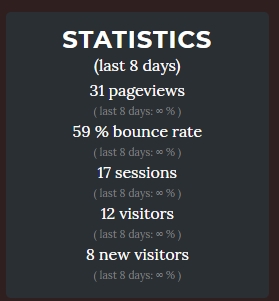
This displays a box with the different metrics selected in your metrics configuration parameter:
I use this for any post:

&#x7B;&#x25;&#x20;&#x69;&#x66;&#x20;&#x70;&#x61;&#x67;&#x65;&#x2E;&#x73;&#x74;&#x61;&#x74;&#x73;&#x2E;&#x70;&#x61;&#x67;&#x65;&#x76;&#x69;&#x65;&#x77;&#x73;&#x20;&#x21;&#x3D;&#x20;&#x62;&#x6C;&#x61;&#x6E;&#x6B;&#x20;&#x25;&#x7D;&#xA;&#x20;&#x20;&#x20;&#x20;&#x7B;&#x25;&#x20;&#x61;&#x73;&#x73;&#x69;&#x67;&#x6E;&#x20;&#x68;&#x76;&#x61;&#x6C;&#x75;&#x65;&#x20;&#x3D;&#x20;&#x68;&#x65;&#x61;&#x64;&#x65;&#x72;&#x2E;&#x76;&#x61;&#x6C;&#x75;&#x65;&#x20;&#x7C;&#x20;&#x70;&#x6C;&#x75;&#x73;&#x3A;&#x20;&#x30;&#x20;&#x25;&#x7D;&#xA;&#x20;&#x20;&#x20;&#x20;&#x7B;&#x7B;&#x20;&#x68;&#x76;&#x61;&#x6C;&#x75;&#x65;&#x20;&#x7C;&#x20;&#x72;&#x6F;&#x75;&#x6E;&#x64;&#x20;&#x7D;&#x7D;&#x20;&#x76;&#x69;&#x65;&#x77;&#x73;&#xA;&#x20;&#x20;&#x20;&#x20;&#x20;&#x20;&#x20;&#x20;&#x20;&#x20;&#x20;&#x20;&#x20;&#x20;&#x20;&#x20;&#xA;&#x20;&#x20;&#x20;&#x20;&#x7B;&#x25;&#x20;&#x69;&#x66;&#x20;&#x73;&#x69;&#x74;&#x65;&#x2E;&#x6A;&#x65;&#x6B;&#x79;&#x6C;&#x6C;&#x5F;&#x67;&#x61;&#x2E;&#x63;&#x6F;&#x6D;&#x70;&#x61;&#x72;&#x65;&#x5F;&#x70;&#x65;&#x72;&#x69;&#x6F;&#x64;&#x20;&#x25;&#x7D;&#xA;&#x20;&#x20;&#x20;&#x20;&#x20;&#x20;&#x20;&#x20;&#x28;&#xA;&#x20;&#x20;&#x20;&#x20;&#x20;&#x20;&#x20;&#x20;&#x6C;&#x61;&#x73;&#x74;&#x20;&#x7B;&#x7B;&#x20;&#x73;&#x69;&#x74;&#x65;&#x2E;&#x64;&#x61;&#x74;&#x61;&#x2E;&#x70;&#x65;&#x72;&#x69;&#x6F;&#x64;&#x20;&#x7D;&#x7D;&#x20;&#x64;&#x61;&#x79;&#x73;&#x3A;&#x20;&#xA;&#x20;&#x20;&#x20;&#x20;&#x20;&#x20;&#x20;&#x20;&#x7B;&#x25;&#x20;&#x69;&#x66;&#x20;&#x70;&#x61;&#x67;&#x65;&#x2E;&#x73;&#x74;&#x61;&#x74;&#x73;&#x2E;&#x70;&#x61;&#x67;&#x65;&#x76;&#x69;&#x65;&#x77;&#x73;&#x5F;&#x70;&#x65;&#x72;&#x63;&#x20;&#x21;&#x3D;&#x20;&#x22;&#x221E;&#x22;&#x20;&#x25;&#x7D;&#xA;&#x20;&#x20;&#x20;&#x20;&#x20;&#x20;&#x20;&#x20;&#x20;&#x20;&#x20;&#x20;&#x7B;&#x25;&#x20;&#x61;&#x73;&#x73;&#x69;&#x67;&#x6E;&#x20;&#x70;&#x65;&#x72;&#x63;&#x20;&#x3D;&#x20;&#x70;&#x61;&#x67;&#x65;&#x2E;&#x73;&#x74;&#x61;&#x74;&#x73;&#x2E;&#x70;&#x61;&#x67;&#x65;&#x76;&#x69;&#x65;&#x77;&#x73;&#x5F;&#x70;&#x65;&#x72;&#x63;&#x20;&#x7C;&#x20;&#x70;&#x6C;&#x75;&#x73;&#x3A;&#x20;&#x30;&#x20;&#x25;&#x7D;&#xA;&#xA;&#x20;&#x20;&#x20;&#x20;&#x20;&#x20;&#x20;&#x20;&#x20;&#x20;&#x20;&#x20;&#x7B;&#x25;&#x20;&#x69;&#x66;&#x20;&#x70;&#x65;&#x72;&#x63;&#x20;&#x3E;&#x20;&#x30;&#x20;&#x25;&#x7D;&#xA;&#x20;&#x20;&#x20;&#x20;&#x20;&#x20;&#x20;&#x20;&#x20;&#x20;&#x20;&#x20;&#x20;&#x20;&#x20;&#x20;&#x3C;&#x69;&#x20;&#x63;&#x6C;&#x61;&#x73;&#x73;&#x3D;&#x22;&#x66;&#x61;&#x73;&#x20;&#x66;&#x61;&#x2D;&#x61;&#x72;&#x72;&#x6F;&#x77;&#x2D;&#x75;&#x70;&#x20;&#x63;&#x6F;&#x6C;&#x6F;&#x72;&#x2D;&#x67;&#x72;&#x65;&#x65;&#x6E;&#x22;&#x3E;&#x3C;&#x2F;&#x69;&#x3E;&#xA;&#x20;&#x20;&#x20;&#x20;&#x20;&#x20;&#x20;&#x20;&#x20;&#x20;&#x20;&#x20;&#x7B;&#x25;&#x20;&#x65;&#x6C;&#x73;&#x69;&#x66;&#x20;&#x70;&#x65;&#x72;&#x63;&#x20;&#x3D;&#x3D;&#x20;&#x30;&#x20;&#x25;&#x7D;&#xA;&#x20;&#x20;&#x20;&#x20;&#x20;&#x20;&#x20;&#x20;&#x20;&#x20;&#x20;&#x20;&#x20;&#x20;&#x20;&#x20;&#x3C;&#x69;&#x20;&#x63;&#x6C;&#x61;&#x73;&#x73;&#x3D;&#x22;&#x66;&#x61;&#x73;&#x20;&#x66;&#x61;&#x2D;&#x65;&#x71;&#x75;&#x61;&#x6C;&#x73;&#x22;&#x3E;&#x3C;&#x2F;&#x69;&#x3E;&#xA;&#x20;&#x20;&#x20;&#x20;&#x20;&#x20;&#x20;&#x20;&#x20;&#x20;&#x20;&#x20;&#x7B;&#x25;&#x20;&#x65;&#x6C;&#x73;&#x69;&#x66;&#x20;&#x70;&#x65;&#x72;&#x63;&#x20;&#x3C;&#x20;&#x30;&#x20;&#x25;&#x7D;&#xA;&#x20;&#x20;&#x20;&#x20;&#x20;&#x20;&#x20;&#x20;&#x20;&#x20;&#x20;&#x20;&#x20;&#x20;&#x20;&#x20;&#x3C;&#x69;&#x20;&#x63;&#x6C;&#x61;&#x73;&#x73;&#x3D;&#x22;&#x66;&#x61;&#x73;&#x20;&#x66;&#x61;&#x2D;&#x61;&#x72;&#x72;&#x6F;&#x77;&#x2D;&#x64;&#x6F;&#x77;&#x6E;&#x20;&#x63;&#x6F;&#x6C;&#x6F;&#x72;&#x2D;&#x72;&#x65;&#x64;&#x22;&#x3E;&#x3C;&#x2F;&#x69;&#x3E;&#xA;&#x20;&#x20;&#x20;&#x20;&#x20;&#x20;&#x20;&#x20;&#x20;&#x20;&#x20;&#x20;&#x7B;&#x25;&#x20;&#x65;&#x6E;&#x64;&#x69;&#x66;&#x20;&#x25;&#x7D;&#xA;&#xA;&#x20;&#x20;&#x20;&#x20;&#x20;&#x20;&#x20;&#x20;&#x20;&#x20;&#x20;&#x20;&#x7B;&#x7B;&#x20;&#x70;&#x65;&#x72;&#x63;&#x20;&#x7C;&#x20;&#x72;&#x6F;&#x75;&#x6E;&#x64;&#x20;&#x7D;&#x7D;&#x20;&#x25;&#x20;&#x7C;&#xA;&#x20;&#x20;&#x20;&#x20;&#x20;&#x20;&#x20;&#x20;&#x20;&#x20;&#x20;&#x20;&#xA;&#x20;&#x20;&#x20;&#x20;&#x20;&#x20;&#x20;&#x20;&#x20;&#x20;&#x20;&#x20;&#x7B;&#x25;&#x20;&#x61;&#x73;&#x73;&#x69;&#x67;&#x6E;&#x20;&#x64;&#x69;&#x66;&#x66;&#x20;&#x3D;&#x20;&#x70;&#x61;&#x67;&#x65;&#x2E;&#x73;&#x74;&#x61;&#x74;&#x73;&#x2E;&#x64;&#x69;&#x66;&#x66;&#x5F;&#x70;&#x61;&#x67;&#x65;&#x76;&#x69;&#x65;&#x77;&#x73;&#x20;&#x25;&#x7D;&#xA;&#x20;&#x20;&#x20;&#x20;&#x20;&#x20;&#x20;&#x20;&#x20;&#x20;&#x20;&#x20;&#x7B;&#x25;&#x20;&#x69;&#x66;&#x20;&#x64;&#x69;&#x66;&#x66;&#x20;&#x3E;&#x20;&#x30;&#x20;&#x25;&#x7D;&#x2B;&#x7B;&#x25;&#x20;&#x65;&#x6E;&#x64;&#x69;&#x66;&#x20;&#x25;&#x7D;&#xA;&#x20;&#x20;&#x20;&#x20;&#x20;&#x20;&#x20;&#x20;&#x20;&#x20;&#x20;&#x20;&#x7B;&#x7B;&#x20;&#x64;&#x69;&#x66;&#x66;&#x20;&#x7C;&#x20;&#x72;&#x6F;&#x75;&#x6E;&#x64;&#x20;&#x7D;&#x7D;&#x20;&#x74;&#x68;&#x61;&#x6E;&#x20;&#x6C;&#x61;&#x73;&#x74;&#x20;&#x70;&#x65;&#x72;&#x69;&#x6F;&#x64;&#xA;&#x20;&#x20;&#x20;&#x20;&#x20;&#x20;&#x20;&#x20;&#x7B;&#x25;&#x20;&#x65;&#x6C;&#x73;&#x65;&#x20;&#x25;&#x7D;&#xA;&#x20;&#x20;&#x20;&#x20;&#x20;&#x20;&#x20;&#x20;&#x221E;&#x20;&#x25;&#x20;&#x20;&#x20;&#x20;&#xA;&#x20;&#x20;&#x20;&#x20;&#x20;&#x20;&#x20;&#x20;&#x7B;&#x25;&#x20;&#x65;&#x6E;&#x64;&#x69;&#x66;&#x20;&#x25;&#x7D;&#xA;&#x20;&#x20;&#x20;&#x20;&#x20;&#x20;&#x20;&#x20;&#x29;&#xA;&#x20;&#x20;&#x20;&#x20;&#x7B;&#x25;&#x20;&#x65;&#x6E;&#x64;&#x69;&#x66;&#x20;&#x25;&#x7D;&#xA;&#x20;&#x20;&#x20;&#x20;&#x2E;&#xA;&#x7B;&#x25;&#x20;&#x65;&#x6E;&#x64;&#x69;&#x66;&#x20;&#x25;&#x7D;

It only displays xx visits (percentage % | difference between two ranges).

Issues

Having issues? Just report in the issue section. Thanks for the feedback!

Best regards!